


Sketch UI
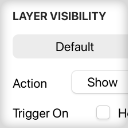
Improvements to Prototype Hotspot Hints
When sharing prototypes with stakeholders, clarity around what is and isn't interactive is essential.
Unlike the final product, not every element in a shared prototype will be wired into the user flow. Without clear visual guidance, viewers risk wasting time clicking on dead ends, losing focus, and losing confidence in the prototype itself. Hotspot hints serve as that guiding layer, steering stakeholders through the intended interactions efficiently and keeping feedback sessions productive.
View a detailed walkthrough of the existing setup, where it falls short, and how the redesign addresses those issues.
Sketch recently expanded its prototyping capabilities to include nested scrolling, but the prototype player's existing hint system, designed to surface interactive click-throughs, was never updated to account for this new interaction type. Scroll interactions were effectively invisible to viewers, creating confusion and undermining the reliability of the prototype as a communication tool.
I diagnosed the root causes of this friction and redesigned the prototype player's UI to address them directly. The updated interface not only signals what a viewer can interact with, but clearly distinguishes between different types of interaction, so that scrollable regions are just as legible as clickable ones. The result is a leaner, more intuitive experience that respects both the stakeholder's time and the integrity of the prototype review process.
See also:


Arbolito
UX/UI • App • Prototyping

Beko PLC
UX/UI • Website • Case Study

#SketchTips
Motion Design • Marketing • Audio Editing

Dog Friendly
UX/UI • Website
Blog Animations
Motion Design • Marketing • Illustration
Parachute Panic
Game • Illustration • Animation • UX/UI • Case Study

Leisure Food
UX/UI • App • Motion Design • Prototyping

Beyond Ynth
Game • Illustration • Animation • UX/UI

Sketch Tutorials
Marketing • UX/UI • Motion Design • Audio Editing

Projecto
UX/UI • App • Case Study

Social Videos
Marketing • Motion Design • Illustration • Audio Editing

Buy: Case Study
Case Study • UX/UI • Marketing • Website
Sketch UX / UI Improvements
Case Study • UX/UI • Prototyping • Motion Design • Audio Editing

London Unfurled
UX/UI • App

Emails
Marketing • Illustration

Canary Islands
UX/UI • Website • Prototyping • Marketing

Blomberg
UX/UI • Website

Icons
UX/UI • Illustration • Marketing • App • Game

This is just a small selection of my work. Please contact me if you wish to see more.